tmux-companion
One binary behind your whole tmux config. It draws the status bar, runs the pickers behind your keybindings, and builds your project sessions, out of a daemon that is already warm.
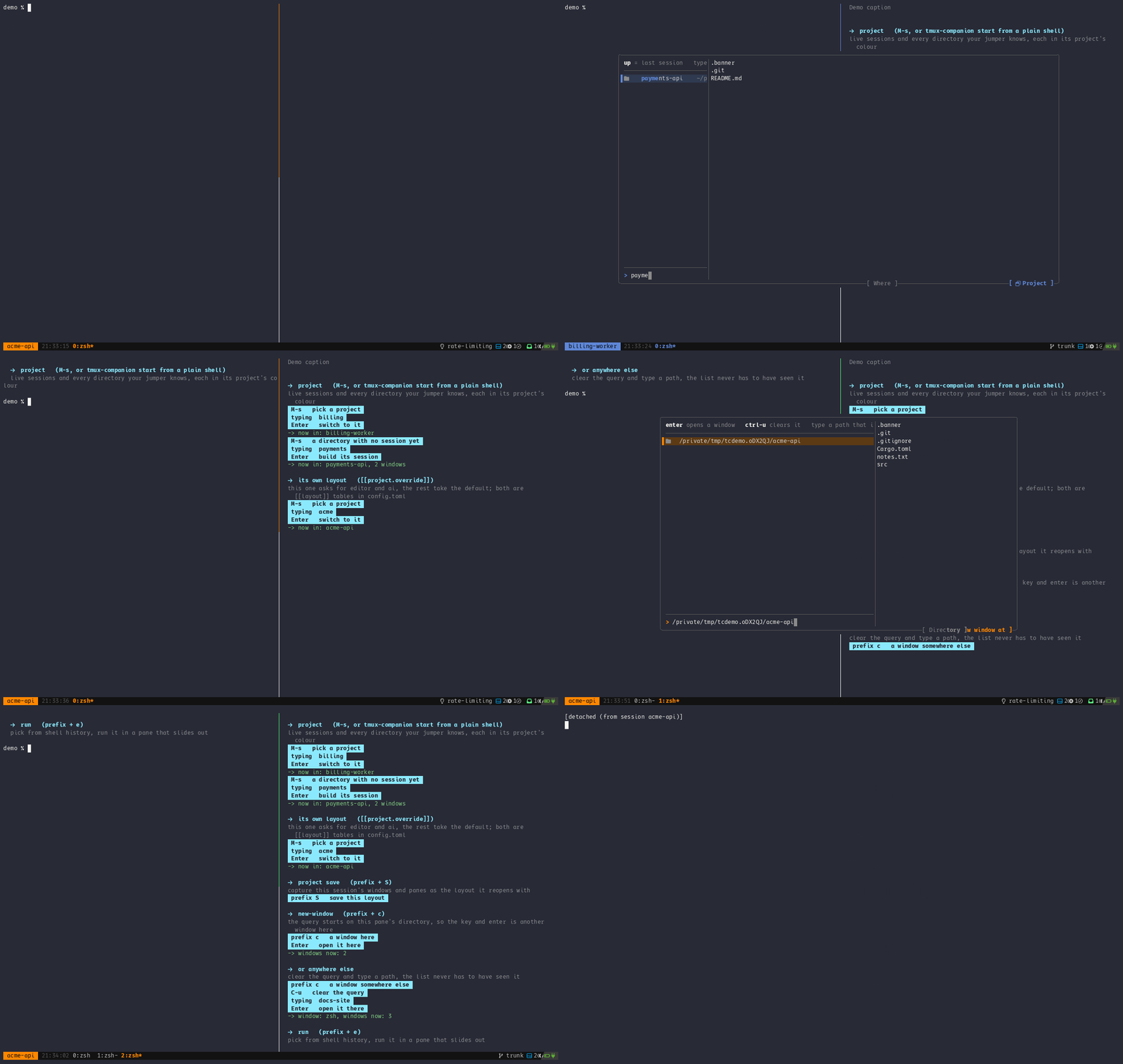
https://asciinema.org/a/1267082
What you get
Section titled “What you get”status-right |
git, bandwidth and battery in one call |
keys |
fuzzy search every binding, press enter to run it |
cheatsheet |
the bindings you keep looking up, until you’ve learned them |
project |
one session per project, sessions and your directory jumper in one list |
project save |
capture this session’s panes as the layout it reopens with |
inbox, brief, journal |
the agents waiting on you and what each asked, a nudge when one waits too long, and what happened today |
sessions |
every session saved on a timer, and sessions resurrect brings them back after a reboot |
panes, search, ports |
jump to any pane, any line of any scrollback, or whatever’s listening on that port |
pocket, zen, kill |
a shell you pull out and put away, everything but this pane out of the way, a hung program stopped with the pane kept |
promote, note, quiet |
a pane into a session of its own, a note on a pane, an hour with nothing nagging |
run |
pick from shell history, run it in a pane that slides out |
open |
open the URL or file:line:col under your cursor |
theme pick |
your themes with a swatch each, applied on the spot; theme init writes six to start |
shell-init |
the prompt marks tmux’s next-prompt has waited for since 3.3 |
sh-jobs |
what’s suspended under this pane, with your icons |
doctor |
everything a bug report needs, in one screen |
Background tasks, all of them off till you turn them on: fetching your repositories so ahead and behind mean something, sourcing tmux’s config when it changes, naming windows after what’s running in them, and saying when a long command finished somewhere you weren’t looking.
Every flag: docs/reference/cli.md.
Try it first
Section titled “Try it first”docker run --rm -it lonkarorg/tmux-companion:playgroundtmux, the binary, five fake projects and a guided tour through the bindings, in a container that goes away when you leave it. Nothing is mounted from your machine. docs/how-to/playground.md.
Install
Section titled “Install”curl -fsSL https://raw.githubusercontent.com/lonkar-org/tmux-companion/main/scripts/install.sh | bashtmux-companion doctorThat downloads the binary for your machine, checks it against the checksums the release published, and puts it on PATH. Nothing to compile. Read the script first if you’d rather not pipe it, which is a fair thing to want.
With tpm:
set -g @plugin 'lonkar-org/tmux-companion'It binds no keys and sets no options. Or clone it and run
cargo build --release yourself.
On a Mac or a Linux with Homebrew:
brew tap lonkar-org/tapbrew trust lonkar-org/tapbrew install tmux-companionHomebrew 7 won’t load a formula from a tap you haven’t trusted, hence the middle
line. That path brings the manual with it, so man tmux-companion works
straight after.
Or from crates.io, compiled on your machine:
cargo install --locked tmux-companionAll five paths, with the flags and how to remove it again, are in docs/how-to/install.md.
Then the way in, from a shell that is not in tmux yet:
tmux-companion setuptmux-companion startThat opens the project picker, live sessions first and then every directory
your jumper knows, and attaches to what you choose. tmux on its own leaves you in
a session called 0 with one bare shell, which is the thing this replaces.
start --last goes back to whatever you were in without asking, and
start ~/src/thing skips the picker.
One line in tmux.conf gets you the bar:
set -g status-right "#(tmux-companion status-right --branch-max-len 40 #{pane_current_path})"That plus set -g status-style bg=colour233,fg=colour251, which the segments
draw against. The file to copy first is
docs/tmux.conf.starter.example: the bar and
the eight bindings worth having on day one.
Then docs/tutorial/first-hour.md takes it from there, one step at a time.
Configuration
Section titled “Configuration”There’s no config file till you write one, and the defaults are what the binary did before the file existed.
tmux-companion config init # a fifteen-line starter, refuses to overwritetmux-companion config checkconfig dump prints every setting with its default instead, all 260 lines of
it, for when you want to see what a key is called.
If your bar’s a row of boxes you don’t have a Nerd Font, and this is the line:
[glyphs]preset = "ascii"Every setting with its default is in docs/config.example.toml, and the reasoning is in docs/reference/configuration.md.
What it doesn’t do
Section titled “What it doesn’t do”- macOS and Linux. Not Windows, and not planned: the whole thing is a unix
socket and a
SIGWINCH. - The pickers need tmux 3.2 for
display-popup -E. The bar is happy on 3.0. - It won’t restore your sessions on its own. It saves them on a timer, and restoring stays on a key you press, cause an automatic restore would resurrect a stale layout over a session you’d already started working in.
- It’s not a theme pack.
theme initwrites six colours and the two files that apply them,theme gen --shadesgrows that to 151, every colour in tmux’s cube whose text clears WCAG AAA, with the contrast computed against your terminal.--shades a4,a5anda6are shorter lists if 151 is more than you want to scroll, down to the original eighteen. After that the palette is yours; it doesn’t compete with catppuccin or rose-pine.
My tmux config shelled out for everything. The bar spawned five processes a
second. Every binding that needed to think ran a zsh script that started a
shell, read some config, called fzf, and exited. I’d built it that way over
years, a script at a time, and never added it up.
So there’s one process now. It holds its caches, answers over a unix socket, and everything my tmux used to shell out for talks to it instead.
I wrote a post about it too: ten years of tmux.
What it costs
Section titled “What it costs”Measured from inside tmux on one machine, against the zsh this replaced, with the method beside the numbers in docs/BENCHMARKS.md.
| the bar | 29.71 ms/s, 3.0% of a core |
| the zsh bar it replaced | 344.01 ms/s, 34.4% of a core |
| a picker, keypress to first row | 86 ms, and the zsh took 82 |
| a picker, CPU per press | 33.3 ms, against 66.7 for the zsh |
| the whole right side, computed | 1.43 ms |
| one fork and exec, as tmux runs it | 13.07 ms |
The picker rows are the honest part. Opening one is not faster: what a person
waits through is display-popup at 21 ms, a process starting and a terminal
painting, and none of that got cheaper. What halved is what it costs to do.
As a library
Section titled “As a library”tmux-companion could also used as layer for your own UX in tmux, providing it as library would enable anyone interested to write functionality or features based on existing API or send PR or Issue to request new or fix existing.
The list below might not be comprehensive, please report if you think something is missing here or should be made part of Public API.
cargo add tmux-companionuse tmux_companion::daemon::Daemon;use tmux_companion::proto::GstArgs;
let segment = Daemon::new()?.git_status(&GstArgs { path: Some("/path/to/repo".into()), ..GstArgs::default()})?;Official crate docs at https://docs.rs/tmux-companion.
Documentation
Section titled “Documentation”| tutorial | docs/tutorial/first-hour.md | from nothing installed to a bar you can see and a picker you’ve pressed |
| how-to | docs/how-to/playground.md | a container to try it in, and the tour inside it |
| how-to | docs/how-to/install.md | the five ways in, and how to remove it |
| how-to | docs/how-to/themes.md | where themes live, what one is, and the contrast they clear |
| how-to | docs/how-to/agents.md | the skill that teaches a coding agent to share your tmux server |
| how-to | docs/how-to/which-key.md | list of key bindings that you could setup and what it could do for you |
| how-to | docs/how-to/things-tmux-already-does.md | logging, menus, moving panes, one config across versions: tmux does these without a plugin |
| reference | docs/reference/cli.md | every subcommand and flag |
| reference | docs/reference/configuration.md | the config file, and what it changes |
| reference | docs/reference/requirements.md | tmux, fonts, platforms, Rust |
| example | docs/tmux.conf.starter.example | the bar and the eight bindings worth having on day one |
| example | docs/tmux.conf.example | the bar I actually run |
| example | docs/tmux.conf.full.example | every feature on, with what each costs |
| example | docs/config.example.toml | every setting with its default |
| explanation | docs/DESIGN.md | how the daemon and the protocol work |
| explanation | docs/BENCHMARKS.md | what it costs, and how that was measured |
| explanation | docs/explanation/cheatsheet.md | why the cheat sheet forgets what you’ve learned |
| contributing | CONTRIBUTING.md | build, test, lint, and what a patch needs |
| contributing | CHANGELOG.md | what changed |
Building
Section titled “Building”Rust 1.95 or newer, which is what the locked dependencies build on. No system libraries.
cargo build --release      # target/release/tmux-companion, about 4 MBcargo test                 # 1179 unit, 32 integration, 45 end-to-end against a real tmux
# on a machine somebody is using, keep off every corenice -n 15 cargo build --release -j 4
Releases carry four binaries: macOS on Apple silicon and Intel, Linux on ARM and on Intel or AMD. The Linux pair link statically against musl, so one binary runs on any distribution.
Patches welcome, including the ones that tell me I got something wrong. CONTRIBUTING.md has the three commands CI runs.
MIT.